Product Journal #9: Live stream holograms on planets, relayed to Twitch, YouTube and Kick
·2 min read·nLink team
Product Journal · part 9 of 20All parts
- 1.the nLink core and its add-ons
- 2.The short link core and the journey of a click
- 3.Bekçi, the security layer for short links
- 4.Share cards, QR codes and the bio page
- 5.Analytics and growth tools
- 6.nLink for teams and developers
- 7.Link Universe, your links become planets (beta)
- 8.Live activities in the universe, space football and flying car races
- 9.Live stream holograms on planets, relayed to Twitch, YouTube and Kick
- 10.Parental controls for accounts of under-18s
- 11.Two ships, Âfâk and Kristal; waking in the pod and walkable rooms
- 12.Four games you play with your ship; Rescue, Courier, Orbit Slingshot and Asteroid Mining
- 13.Games on planets; Sudoku Planet, Mushroom Planet and Slime Workshop
- 14.Fading Stars, digital literacy through play
- 15.Design your planet; look studio, identity, surface editor and buildings
- 16.Day, night and dynamic weather on planets; realistic textures
- 17.The Link Universe is open to all; guest pilots and playing on phones
- 18.Core updates; daily site analytics, cookie choice and a new Bekçi rule
- 19.Seyyah (Eren); a new game of Anatolian legend and Sufi lore in the Link Universe
- 20.Cutscenes, automatic travel and neighbouring planets in the sky
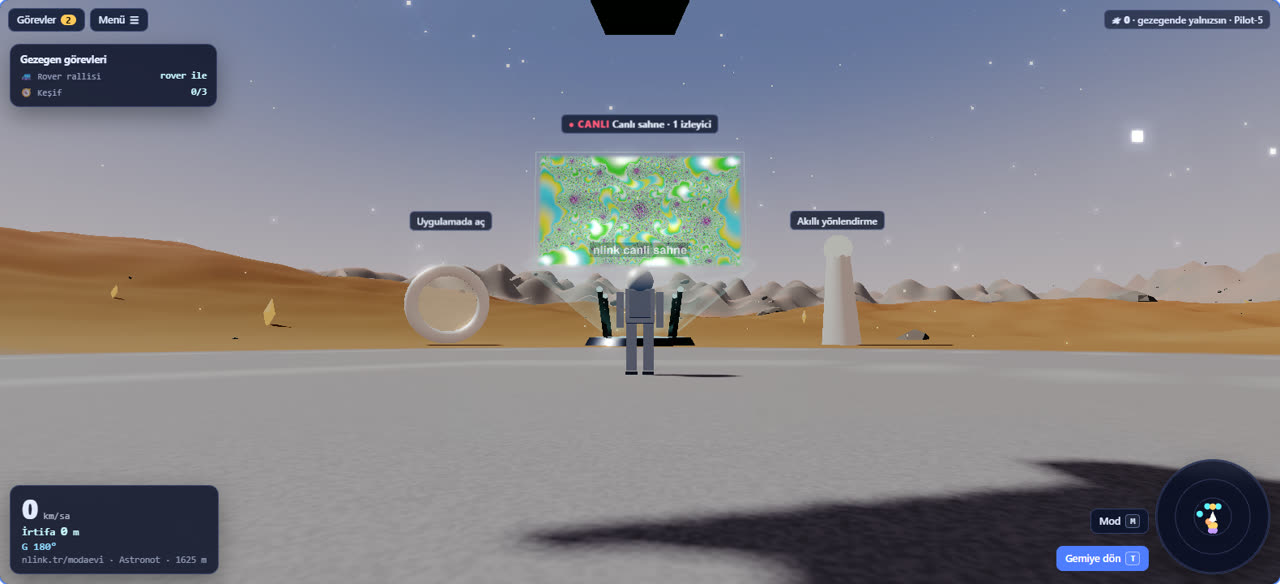
In the Link Universe a large hologram screen can be placed in a planet's square. It carries live video and audio; pilots who land on the planet watch the stream there, together.
How does it work?
- The streamer connects with OBS: WHIP (about 0.5 s latency), RTMP or SRT. Each hologram has its own stream key, shown only once when it is created.
- The screen is 16 × 9 metres and turns toward the viewer. Audio depends on distance: full at the foot of the screen, silent at 200 metres. The planet's music is lowered while you are close.
- The nearest live hologram on the planet plays; the connection closes when the tab is hidden or you take off, so no data is wasted.
- On a weak connection the player switches to low-latency HLS by itself, and it reconnects if the stream freezes.
The same stream on Twitch, YouTube and Kick
Up to 4 platform channels can be set for each hologram. When the stream starts, video and audio go to these channels at the same time; when it ends, the relay stops. The streamer runs one stream, and the universe and the platforms are live together.
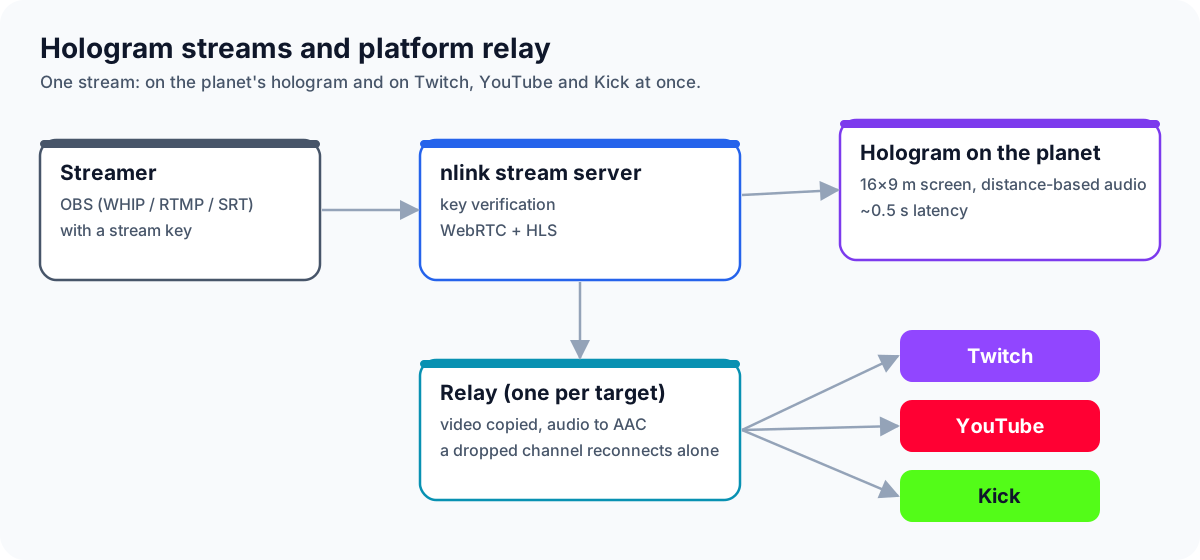
- Each channel is separate: if one platform drops, only that one reconnects; the others keep going.
- Quality is kept: video is passed through without re-encoding; audio is converted to the format platforms expect (AAC).
- Keys are safe: platform stream keys are stored encrypted and never shown again. They can only be sent to Twitch, YouTube and Kick's own servers.
Who can use it?
For now the nLink team sets up holograms, for events like concerts, launches and tournament commentary. If you'd like a live stream on your brand's planet, get in touch. Next up: players streaming their own game to Twitch and YouTube straight from the browser.