Product Journal #4: Share cards, QR codes and the bio page
·1 min read·nLink team
Product Journal · part 4 of 20All parts
- 1.the nLink core and its add-ons
- 2.The short link core and the journey of a click
- 3.Bekçi, the security layer for short links
- 4.Share cards, QR codes and the bio page
- 5.Analytics and growth tools
- 6.nLink for teams and developers
- 7.Link Universe, your links become planets (beta)
- 8.Live activities in the universe, space football and flying car races
- 9.Live stream holograms on planets, relayed to Twitch, YouTube and Kick
- 10.Parental controls for accounts of under-18s
- 11.Two ships, Âfâk and Kristal; waking in the pod and walkable rooms
- 12.Four games you play with your ship; Rescue, Courier, Orbit Slingshot and Asteroid Mining
- 13.Games on planets; Sudoku Planet, Mushroom Planet and Slime Workshop
- 14.Fading Stars, digital literacy through play
- 15.Design your planet; look studio, identity, surface editor and buildings
- 16.Day, night and dynamic weather on planets; realistic textures
- 17.The Link Universe is open to all; guest pilots and playing on phones
- 18.Core updates; daily site analytics, cookie choice and a new Bekçi rule
- 19.Seyyah (Eren); a new game of Anatolian legend and Sufi lore in the Link Universe
- 20.Cutscenes, automatic travel and neighbouring planets in the sky
A link is often seen before it is clicked: a preview card on WhatsApp, a QR code on a poster, a single address in an Instagram bio. nLink's sharing tools put that first impression in your hands.
Share card
- Decide how your link looks on WhatsApp, X, Facebook, LinkedIn and Threads with 6 templates: title, description, image.
- Verify your own sites with domain verification and customize the title and description of links to them too.
- When you change a preview, the caches of Facebook, Threads and Messenger are refreshed automatically, so the old card doesn't stick.
- Everyone gets a card; customizing it starts with the Silver plan.
QR codes
The free QR code generator needs no account: it creates QR codes for links, text, Wi-Fi, e-mail or phone numbers. Pick a color, dot and corner style, put the nLink logo or your own logo in the middle, and download PNG or SVG up to 2048 pixels. The QR is generated entirely in your browser; what you type is not sent to us.
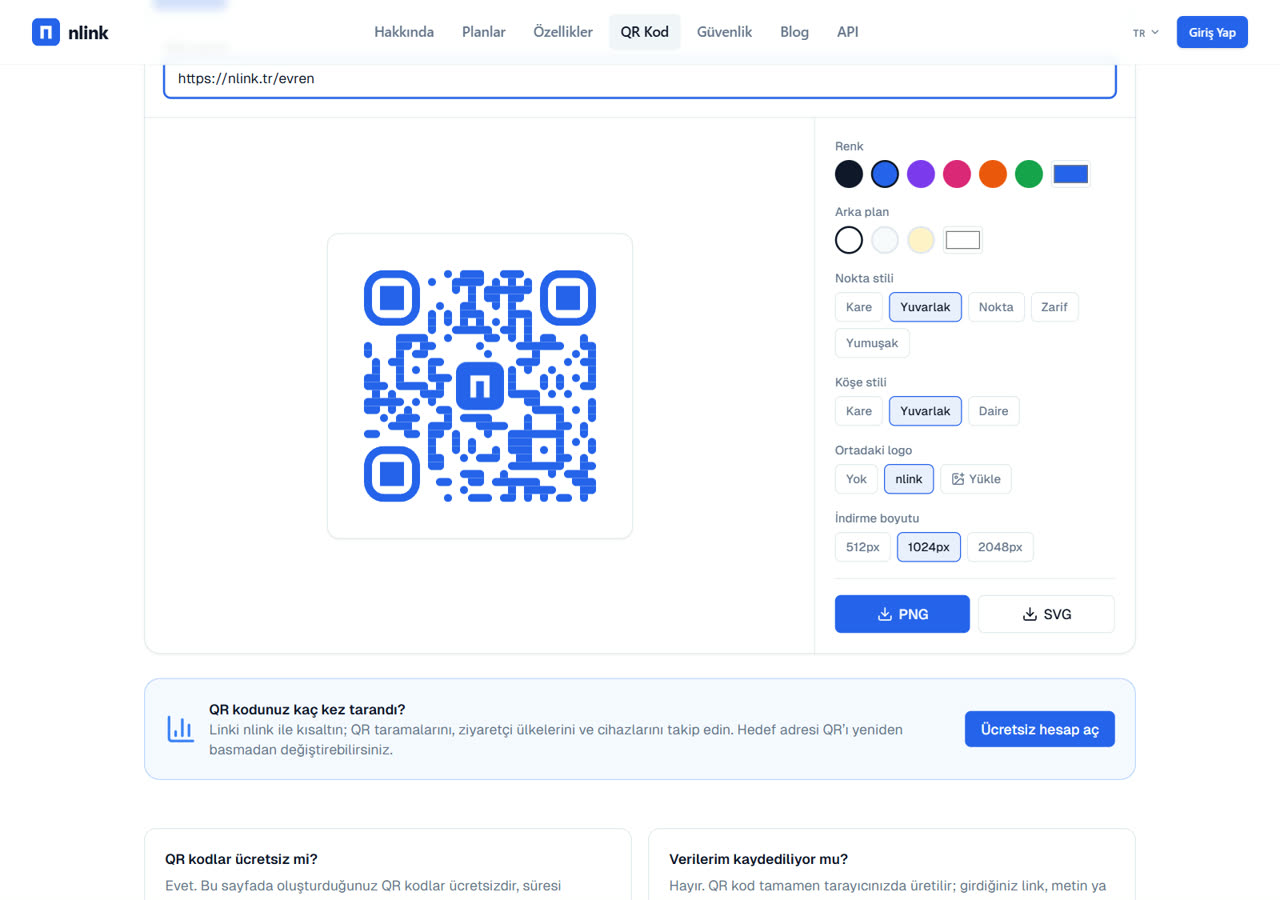
Link the QR to an nLink short link and you gain two things: scans are counted separately in statistics, and you can change the destination without reprinting the QR.
Bio page
Social media bios accept a single link. The bio page gathers all your accounts and important links at nlink.tr/bio/yourname: pick a ready-made theme, drag links into order and share the address and its QR code everywhere. Step by step: How to make an Instagram link in bio