Product Journal #17: The Link Universe is open to all; guest pilots and playing on phones
·1 min read·nLink team

Product Journal · part 17 of 20All parts
- 1.the nLink core and its add-ons
- 2.The short link core and the journey of a click
- 3.Bekçi, the security layer for short links
- 4.Share cards, QR codes and the bio page
- 5.Analytics and growth tools
- 6.nLink for teams and developers
- 7.Link Universe, your links become planets (beta)
- 8.Live activities in the universe, space football and flying car races
- 9.Live stream holograms on planets, relayed to Twitch, YouTube and Kick
- 10.Parental controls for accounts of under-18s
- 11.Two ships, Âfâk and Kristal; waking in the pod and walkable rooms
- 12.Four games you play with your ship; Rescue, Courier, Orbit Slingshot and Asteroid Mining
- 13.Games on planets; Sudoku Planet, Mushroom Planet and Slime Workshop
- 14.Fading Stars, digital literacy through play
- 15.Design your planet; look studio, identity, surface editor and buildings
- 16.Day, night and dynamic weather on planets; realistic textures
- 17.The Link Universe is open to all; guest pilots and playing on phones
- 18.Core updates; daily site analytics, cookie choice and a new Bekçi rule
- 19.Seyyah (Eren); a new game of Anatolian legend and Sufi lore in the Link Universe
- 20.Cutscenes, automatic travel and neighbouring planets in the sky
The Link Universe is now open to everyone. Nothing to install and no account needed: anyone who opens the page plays as a guest pilot.
Guest pilot
- The opening story, the bridge, flight, warp, landing on public planets, surface exploration and planet games are all open.
- Guests join multiplayer rooms too: they appear on the planet and play alongside others.
- Progress is stored on the device and moves to your account when you sign up.
- Your own planet, quest rewards and leaderboard entries are for members. Shorten a link and sign up, and your link becomes your planet.
On phones
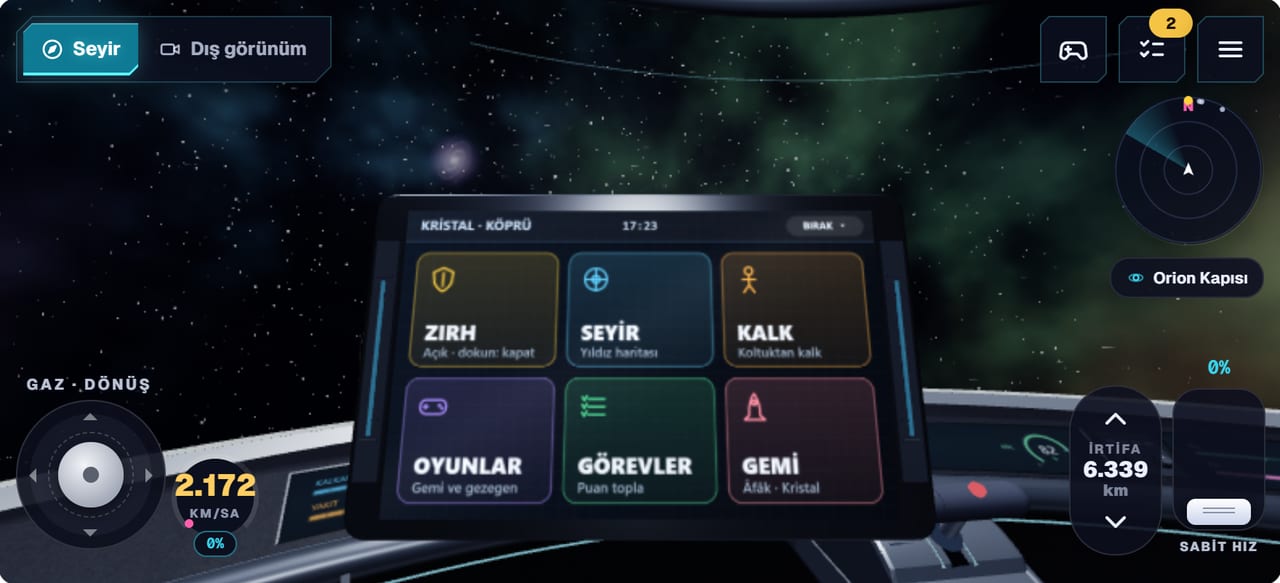
- Landscape and portrait layouts; touch sticks and icon buttons.
- Tap to walk: tap a spot on the planet and your character walks there, finding a way around obstacles.
- One tap at the start turns on full screen and sound together. Add the site to your home screen to open it like an app.
- To keep phones cool, the frame rate is capped and resolution adapts to the device; the audio load was reduced.
Inside the game
- Esc menu: resume, games, quests, star map, ship choice, settings, sound, controls and quit in one place.
- Report a bug (members): a short note plus the game's current state and a screenshot goes to the team. You get an email when its status changes.