Product Journal #10: Parental controls for accounts of under-18s
·2 min read·nLink team
Product Journal · part 10 of 20All parts
- 1.the nLink core and its add-ons
- 2.The short link core and the journey of a click
- 3.Bekçi, the security layer for short links
- 4.Share cards, QR codes and the bio page
- 5.Analytics and growth tools
- 6.nLink for teams and developers
- 7.Link Universe, your links become planets (beta)
- 8.Live activities in the universe, space football and flying car races
- 9.Live stream holograms on planets, relayed to Twitch, YouTube and Kick
- 10.Parental controls for accounts of under-18s
- 11.Two ships, Âfâk and Kristal; waking in the pod and walkable rooms
- 12.Four games you play with your ship; Rescue, Courier, Orbit Slingshot and Asteroid Mining
- 13.Games on planets; Sudoku Planet, Mushroom Planet and Slime Workshop
- 14.Fading Stars, digital literacy through play
- 15.Design your planet; look studio, identity, surface editor and buildings
- 16.Day, night and dynamic weather on planets; realistic textures
- 17.The Link Universe is open to all; guest pilots and playing on phones
- 18.Core updates; daily site analytics, cookie choice and a new Bekçi rule
- 19.Seyyah (Eren); a new game of Anatolian legend and Sufi lore in the Link Universe
- 20.Cutscenes, automatic travel and neighbouring planets in the sky
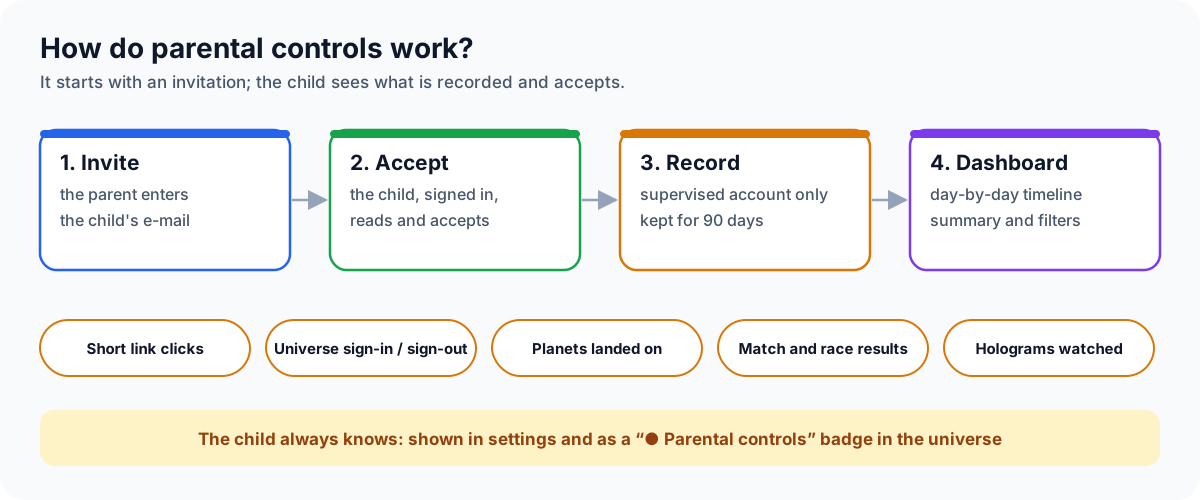
With the Link Universe, nLink became a game world, and games attract young people. Parental controls let you see what your under-18 child does in their nLink account. It is not hidden monitoring: the child accepts the invitation and always knows they are supervised.
How is an account linked?
- Open Parental controls from the menu and enter the e-mail of your child's nLink account.
- Your child receives an invitation e-mail valid for 7 days.
- Your child signs in with their own account, reads what will be recorded and accepts. The invitation can only be accepted with the account of the invited address.
What do you see?
- Links: nLink short links they clicked and the sites they led to, with the time.
- Universe sessions: when they entered and left the Link Universe, how long they stayed and the planets they landed on.
- Activities: matches and races they joined and the results (position and time, or won/lost).
- Holograms: live streams they watched and for how long.
In the dashboard you pick a day: a summary on top (time in the universe, link clicks, activities, stream watching) and an hour-by-hour timeline below. Records are kept for 90 days, and only the period after supervision began is shown.
What does the child see?
- "Your account is under parental controls" in account settings, with who supervises it.
- A "● Parental controls" badge at the top of the screen in the Link Universe.
- A clear list of what is recorded.
Limits and privacy
- A parent can supervise up to 5 accounts, and an account can have up to 2 parents. The parent ends supervision; recording stops when it ends.
- Records are kept only for the supervised account; nothing is recorded for other users.
- Link clicks are visible on nlink.tr addresses in a browser signed in to the account; links on custom domains are not included.
Next
Coming as an add-on: screenshots, taken automatically at intervals while the child is in the universe and on demand when the parent asks. Also per-minute frames from the streams watched.